Pull the verdicts you already have
Aftermath reads Windows Defender's own detection history and event logs. It never rescans your files or claims to catch something Defender missed.
What an infection changed. What removal left behind. Proven in one pass.
Windows Defender flags the payload. It doesn't tell you about the hijacked RunOnce key, the persistent scheduled task, or the weaponized browser extension left behind. Aftermath ingests Defender's verdicts, exposes every machine modification, and quarantines leftovers safely — so the same machine doesn't come back to your desk in three weeks.
"Threat removed" is where most tools stop. It's rarely where the problem actually ends.
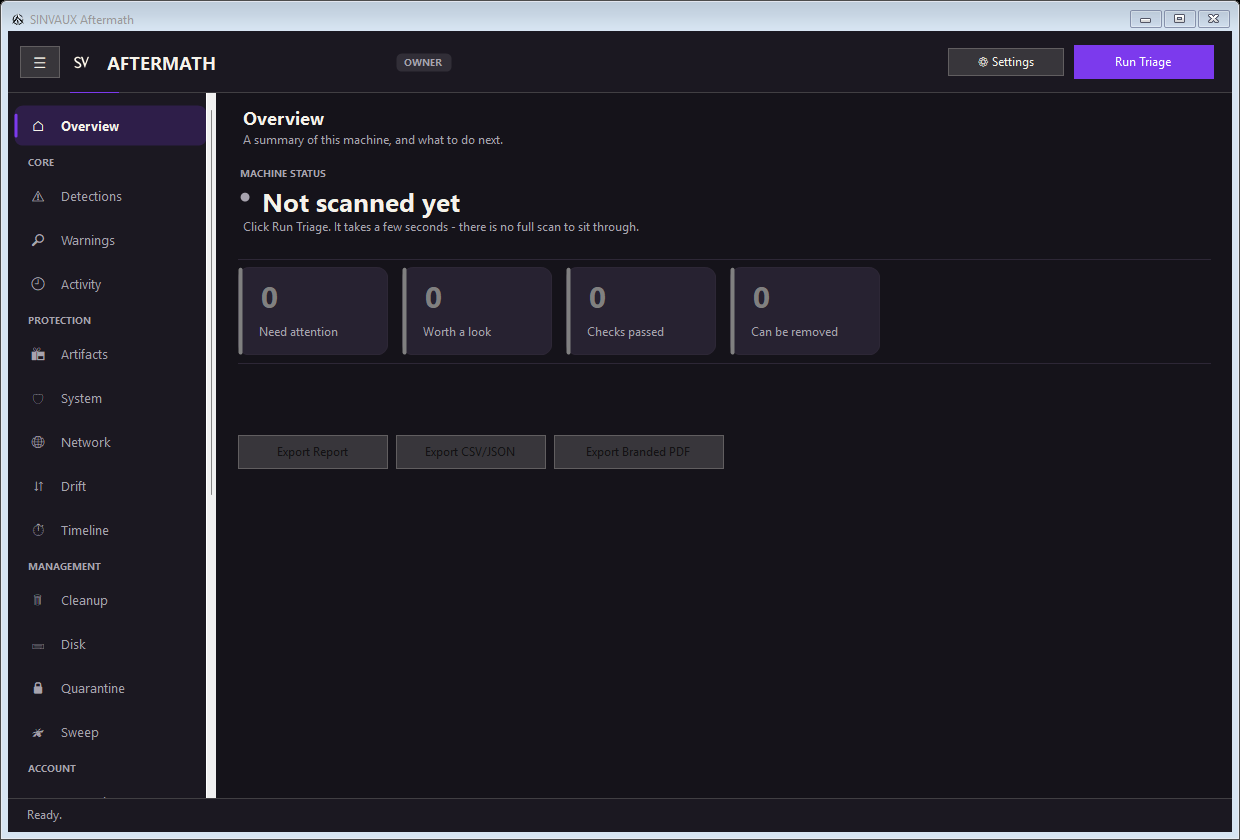
A real desktop app, not a concept.
Aftermath runs locally on Windows 10/11 — no account, no cloud upload, no second detection engine pretending to compete with Defender. What's below is the actual page structure.
Aftermath finds what changed since the last clean scan — it does not itself decide whether Defender's original detection was correct. That judgment call is still yours; Aftermath's job stops at showing you everything the infection left behind.
Five steps. No new engine to trust.
Aftermath reads Windows Defender's own detection history and event logs. It never rescans your files or claims to catch something Defender missed.
Startup entries, scheduled tasks, persistence keys, network artifacts — checked in one pass instead of five separate native tools.
Flagged items move to a restorable quarantine — not a permanent delete — so a wrong call doesn't break the machine.
Drift compares the machine against that snapshot later, so a silent reinfection shows up as a flagged change, not a mystery.
When one machine isn't the only one at risk, Sweep pushes the same triage to a host list — agentless, no standing account.
Situations Aftermath was actually built to handle.
A machine gets cleaned, but something comes back a few weeks later. Nobody knows if it's a new infection or the same one that never fully left.
A saved baseline flags exactly what changed since the last clean scan — the new scheduled task, the modified run key.
The real reinfection vector, instead of a second guessing game.
Defender says "threat removed" and closes the notification. There's no visibility into whether anything else is still on the machine.
Detections, Exposure, and History lay out everything Defender caught and what's still present, in one view.
Confidence the cleanup is actually done — not just quiet.
One person is responsible for several machines and there's no budget for a full EDR platform to watch all of them.
Sweep pushes the same triage to a host list — agentless, no software to deploy ahead of time, no standing account.
The same visibility across several machines, without a new platform to buy.
Cleanup was done, but there's nothing to show for it afterward — no record of what was found or removed.
Pro and Max tiers export a branded PDF report straight from a session.
A record that closes the ticket, instead of a memory of what happened.
What actually changes when you use it.
One pass through Startup, Persistence, and Network instead of five separate native tools, checked by hand.
A saved baseline flags silent changes automatically — no need to remember what "normal" looked like.
Detections and History put what Defender already found in front of you immediately, not buried in Event Viewer.
Sweep repeats the same triage across a host list without deploying agents ahead of time.
Quarantine, not permanent delete, by default — a wrong call doesn't turn into a second incident.
A branded, exportable report closes the loop on what was found and what was done about it.
Starts on one machine. Doesn't stop there.
No account, runs fully offline. Free covers a real cleanup; Plus/Pro/Max add deeper investigation, Drift baselines, and reporting.
One person triaging several machines from a single session — agentless push/pull, no software pre-deployed, no standing account.
Fleet, a separate product built for this: unlimited hosts, an org account, role-based access, and priority support.
One technician, one ticket, start to finish.
Defender flagged something on a shared machine overnight. The alert says "threat removed" — nothing else.
Two detections already quarantined by Defender. Persistence shows three startup entries Defender never touched.
The leftover entries move to quarantine. History logs the action with a timestamp, restorable if anything breaks.
Drift now has a clean snapshot of this machine — any future change shows up as a flagged difference, not a surprise.
Four other machines shared the same network drive. Sweep runs the same triage against all four from one session.
A branded PDF export goes into the ticket — what was found, what was removed, and when.
Aftermath doesn't replace Defender. It replaces the pile of native tools you'd otherwise open around it.
No detection engine of its own, so there's nothing about its findings to take on faith — only how it handles them.
Every scan, quarantine action, and Drift check is logged locally.
Control how long History and Artifacts are kept, from Settings.
Configure what Aftermath watches, in plain settings — nothing hidden.
Transparent about exactly which actions need elevated rights, and why.
Every removal is restorable by default until you purge it yourself.
See and manage your tier directly from Settings → License.
Exportable PDF record of a session — Pro and Max tiers.
Clear about exactly what Aftermath reads and touches, and nothing more.
| Manual approach | Aftermath |
|---|---|
| Hunt across Autoruns, Event Viewer, Task Scheduler, and the registry separately | One view: Detections, Startup, Persistence, Network, System |
| Run a second AV engine and hope it agrees with the first | Reads the verdicts your existing Defender already reached — no second engine to trust |
| Delete and hope nothing breaks | Quarantine with restore, not permanent by default |
| Repeat the same walkthrough by hand on every machine | Sweep pushes the same triage to a host list, agentless |
| No record of what was actually done | Branded, exportable report — Pro and Max tiers |
Free covers a real cleanup. Paid tiers cover the next one — and the one after that, across more machines.
Explore how it fits into your team's cleanup workflow, from one PC to several.
Pricing · Log in · Enterprise · Aftermath, by BackEnd